Reports play a pivotal role in evaluating the effectiveness and success of various activities and initiatives within an organization. In the context of email marketing, reports provide valuable insights into the performance of email campaigns, subscriber engagement, and overall marketing efforts. By analyzing key metrics and trends, reports enable marketers to make data-driven decisions, optimize strategies, and drive better results.
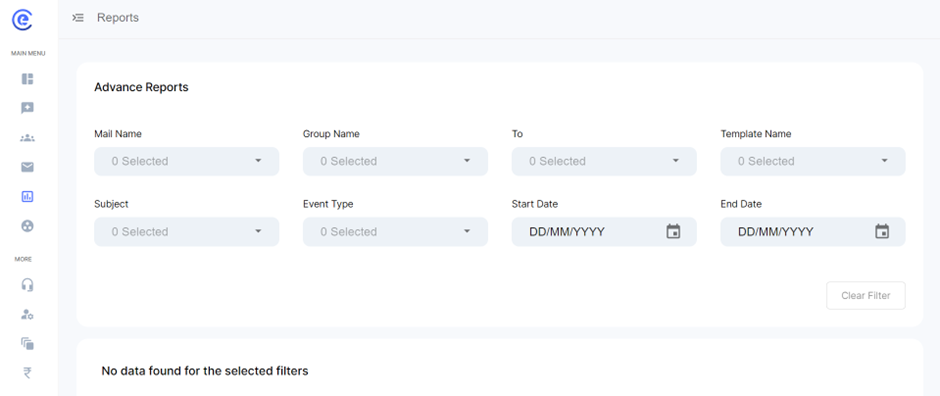
Mail Type:
- This parameter categorizes emails based on their type, such as promotional, transactional, or informational. Understanding the distribution of email types provides insights into the purpose and effectiveness of different types of email campaigns.
Group Name:
- Users can filter reports based on specific subscriber groups, allowing for targeted analysis of campaign performance among different audience segments. Analyzing group-specific metrics helps identify trends and preferences among distinct subscriber cohorts.
Sending To:
- This filter enables users to analyze email performance based on recipient characteristics, such as subscriber demographics, location, or engagement levels. Understanding how emails perform among different recipient segments informs segmentation strategies and targeting efforts.
Template Name:
- Users can track the performance of specific email templates by filtering reports based on template names. This allows users to identify high-performing templates, optimize underperforming ones, and maintain consistency in branding and messaging across campaigns.
Subject:
- Analyzing email performance based on subject lines provides insights into the impact of messaging on recipient engagement. Users can identify subject line strategies that resonate with their audience and optimize future campaigns for maximum effectiveness.
Event Type:
- Event types categorize specific actions or events related to email interactions, such as opens, clicks, bounces, or unsubscribes. Analyzing event-specific metrics helps users understand how recipients engage with their emails and identify areas for improvement in campaign performance.
Start Date and End Date:
- Users can specify a date range for the report analysis, allowing for trend analysis over time and comparison of performance between different time periods. This helps identify seasonal trends, campaign effectiveness over time, and the impact of specific events or promotions on email engagement.
Settings to Help You Find Data Found for the Selected Filters:
- This section may include additional settings or options to refine and customize the report analysis based on user preferences. These settings could include options to adjust reporting intervals, apply additional filters or segments, or export data for further analysis or sharing.
By leveraging these advanced reporting features and filters, users can gain valuable insights into the performance of their email campaigns, identify areas for optimization and improvement, and make data-driven decisions to drive better results and ROI from their email marketing efforts.